High Availability Firewall on Proxmox
Setting up VLANs to force traffic to a firewall with high availability enabled in a Proxmox cluster
In which I show how I implemented a resilient edge device for my lab.
The Problem
If my pfSense VM goes offline due to a cat eating the network cable or a fried power supply, pfSense needs to migrate to another node, and I need to trust that no network traffic leaks into the wider network.
The Genesis
When I started my homelab, I wanted to put everything I would be testing, whether it was benign, insecure, or malicious, behind a firewall in order to keep the guest network secured and segregated from my home network. Each of the guests would require some amount of compute from the host hypervisor, and one mini PC would not be enough to do everything. I also needed to have nodes in the cluster available to migrate a guest if it goes offline, for high availability.
Extra context concerning high availability:
In its current configuration, there are five Proxmox nodes in the datacenter. High availability in this context means that if the datacenter loses one of these nodes, any guests marked “HA” which were running on the client would migrate to another node in the cluster.
In addition, the Corosync cluster manager requires some decision to be executed by vote, requiring a quorum. For example, if MFA is enabled, each node will submit its vote to verify that your MFA token is legitimate. If the cluster cannot establish a “quorum,” defined as “one more than one half” of the cluster, it cannot proceed. In the current setup, that means at least three nodes must be present in order to pass the vote.
After installing Proxmox to each of the nodes, adding them to the same datacenter, and installing and configuring Ceph, we’re left with the question of the firewall.
A Linear Topology
In VirtualBox, it’s very simple to create a pfSense VM, attach one network connection to the main bridge, attach the other network to an internal network, and lastly attach any client guests to that internal network. It is similarly simple on a single Proxmox node: attach pfSense’s WAN port to vmbr0, attach the LAN to vmbr1, and attach client guests to vmbr1.
A Star Topology
When we have more than one node in a Proxmox environment and disperse guests between those nodes, we lose the option to have guests behind pfSense on that internal network. However, we still need to have network segregation, and we need clients to find the correct gateway regardless of which node each guest or the pfSense VM is on. So how do we solve this problem?
As far as the physical infrastructure goes, the network is a completely flat, star topology. Everything is connected to one 16-port switch.
Since we aren’t using the traditional three-tier architecture physically, we need to implement it virtually, with VLANs.
A VLAN Primer
Is it networking basics? Yes. Anyone with a CCNA should be able to configure this, and anyone with a Network+ should at least be able to describe it.
Why is it relevant to security? Because there should be no circumstance where internal network traffic is exposed to the larger network, even when those different networks travel over the same physical devices; this addresses a concern of confidentiality. We are also addressing availability by ensuring that if the firewall or a client guest migrates to another node, the networking doesn’t break.
Left with its default configuration, the star topology would leave all nodes on the same broadcast domain, and a DHCP client that is supposed to be behind the firewall, when sending a DHCPDISCOVER packet, would be subject to a race condition where the home network default gateway could respond instead of the pfSense VM. In addition, if any malicious guests were exposed to the home network … that would be bad.
If we pretend a threat actor plugs their device into the lab network and tries to get into the home network, we want to be sure that there is no way to circumvent the safeguards, and all traffic would be forced through the firewall, failing if the firewall is offline, and returning to normal operation after the firewall is migrated and back online.
The Solution
How do VLANs solve this?
Instead of relying on a layer 3 device to do routing between subnets, we use VLAN tags to mark Ethernet frames and segregate broadcast domains at layer 2 to get to the correct layer 3 device.
For home network traffic, we will leave everything default. On my switch, that means VLAN 1. My workstation, the NAS, any home services, and the Proxmox nodes themselves, will be communicating on that VLAN, in addition to the WAN port of pfSense.
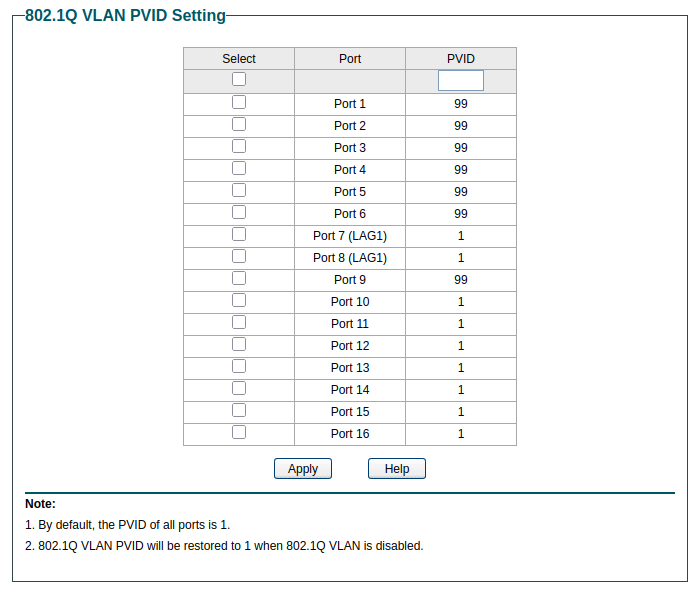
The lab network, on the other hand, needs to be on separate VLANs. I’ve created four additional VLANs: 10 for management, 20 for servers, 30 for clients, and 99 for untagged traffic - which will be discarded.
Don’t make these changes on the switch until after the changes on the nodes have been made; any node that is not set up to be communicating on the correct VLAN will be unreachable, and if enough are unreachable that the cluster loses quorum, you will not be able to use MFA to log into the GUI, and you will need to reverse the changes.

Since I still want my other devices to be able to communicate via untagged traffic on VLAN 1, I’ve left those ports set to PVID 1.
On each of the Proxmox nodes, we want to change the configuration of vmbr0. Specifically, we need to add “.1” to the end of the NIC. This specifies that the port is specifically tagged for VLAN 1. Frames going out will be tagged for that VLAN, and any incoming traffic on that VLAN will go to that port.

Once vmbr0 is tagged for VLAN 1, it’s safe to apply the network settings and change the port configuration and PVID settings on the switch.
That will keep everything copacetic with the home network, and it will be the WAN port for pfSense. For the LAN port on pfSense, we create vmbr1 with the same port, no IP address, and no VLAN tag. However, we do want it to be VLAN aware. Once vmbr1 is created, we can start the pfSense installer, where we can tell it which of the ports is which.
Now that pfSense is hooked up with vmbr0 as WAN and vmbr1 as LAN, each of those bridges is set to the proper VLAN settings, and those settings are replicated on each Proxmox node, the pfSense VM should be able to safely migrate from one node to another without breaking the network.
We can now create client guests and attach them to vmbr1. Regardless of which node it’s on, and regardless of whether it’s a VM or a container, as long as it’s on vmbr1, its traffic will flow to pfSense.